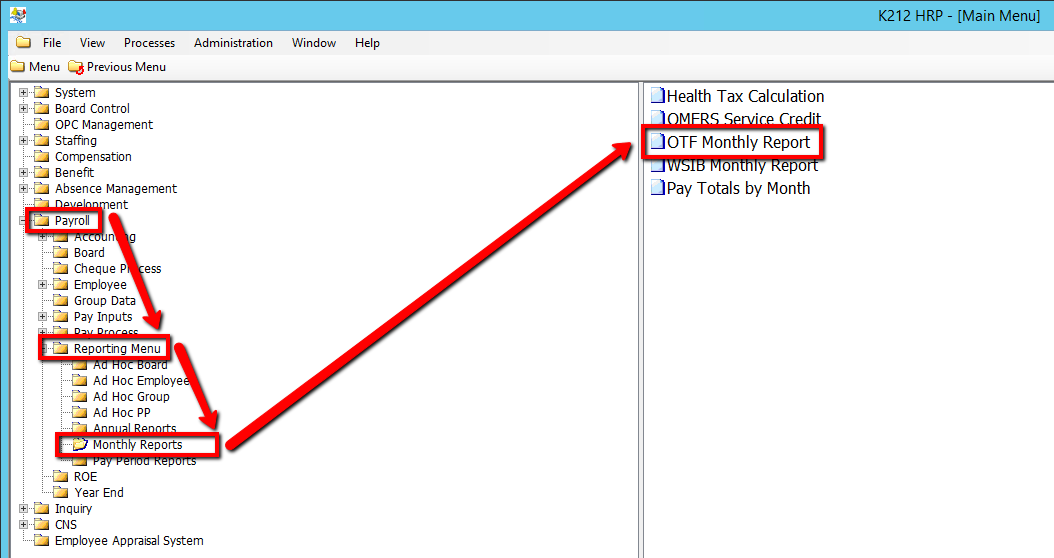
How to Run an OTF Monthly Report
This background process is used to submit a batch job to calculate and generate the reports produced monthly for reporting to the OTF (Ontario Teachers' Federation). This process should not be run until all pay processing for the reporting month is completed. Once this sub-routine is executed, a statistics report is produced. You can either print this report in hard copy or produce the magnetic tape.
Use the following steps to Run an OTF Monthly Report:
1. Click on Payroll
2. Click on Reporting Menu
3. Click on Monthly Reports
4. Click on OTF Monthly Report
.png)
5. Select a Year and Month for Calculation value
6. Select a Report SIN value
7. Select a Report Address value
8. Click on the Submit button to generate the report
.png)