Ontario Provincial Report Cards (Grade 1- 8) Validation Report
You can determine which students have areas that have any incorrect
or missing report card data (based on the growing success document). This
report will also aid in ensuring that the OnSIS submission for marks is
accurate as well.
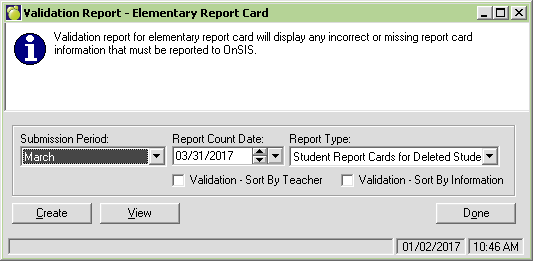
- Choose Marks, Print Report Cards, Ontario Provincial Report Cards
(Grades 1-8) - Validation Report.
- Choose the submission period, Report Count Date and the Report
Type from the pull-down menus. Note: the software only includes
deleted students in the March submission period. This submission only
includes Report 1 from the report card.To do a validation on all students
for reporting period 1, change the submission period to June, the
count date to 03/31/2017, and the Report Type to Student Report Cards.
- Next, select to sort the validation report by teacher or by information.
- Click the Create button at the bottom left side of the screen.
Further options on student filters for the report are now available
(i.e. alphabetically, by grade, etc.).
The default sort for this report is by student. The report will list
the student name (and additional information - OEN, Status, Grade, Entry
and Retirement dates, Homeroom Teacher and Class/Homeroom) and will then
list any/all areas where incorrect or missing data occurs.
Additional sort options have been added to allow for ease of correction.
Validation - Sort by Teacher
When selected, this option produces a report sorted by teacher, then
by student and includes all errors for each student. The report also includes
the student specific data such as OEN, Status, Grade, Entry and Retirement
dates.
Validation - Sort By Information
When selected, this option produces a report sorted by each area of
incorrect or missing report card data (i.e. all ART-21 errors first, then
all ART-23 errors etc. The report identifies the area, then includes all
students (sorted alphabetically) that have the same error. The report
also includes the student specific data such as OEN, Status, Grade, Entry
and Retirement dates, Homeroom Teacher and Class/Homeroom.
Rules in the Validation Report
The rules within this report follow the guidelines within the ministry's
Growing
Success document. Some of the business rules included in this validation
report are:
- If Subject = Language (LAN-10) and NA Flag = 'T', then student
must have a mark for the Subject = French (FRE-10) and Report Card
Second Language Program = Immersion (FSI)
- Marks must be reported for at least 4 strands for each available
report period for Subject = Mathematics (MAT-20 or MAT-30)
- For the subject Mathematics (MAT-20 or MAT-30) if mark is reported
in periods 1 and 2 then 5 strands must be reported with mark at least
once over the available report periods
- For each available report period, mark must be submitted in at
least 3 strands for the subject = Arts (ART-20 or ART-30)
- For the subject = Arts (ART-20 or ART-30), if mark is reported
in periods 1 and 2 then 4 strands must be reported with mark at least
once over the available report periods
- If Subject = History and a mark is reported then Subject Geography
must have NA Flag = 'T' in that report period
- If Subject = Geography and a mark is reported then Subject History
must have NA Flag = 'T' for that report period
- If data is submitted for Report Periods 1 and 2 and if grade =
7 or 8 then mark in History (HIS-20 or HIS-30) and mark in Geography
(GEO-20 or GEO-30) must be submitted in ONLY one of the report periods.