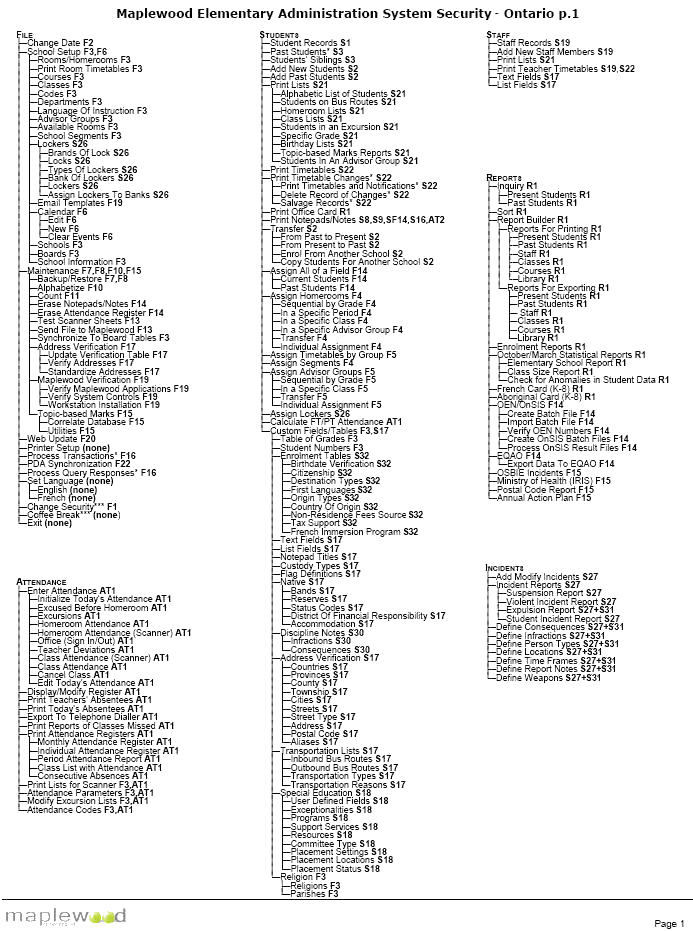
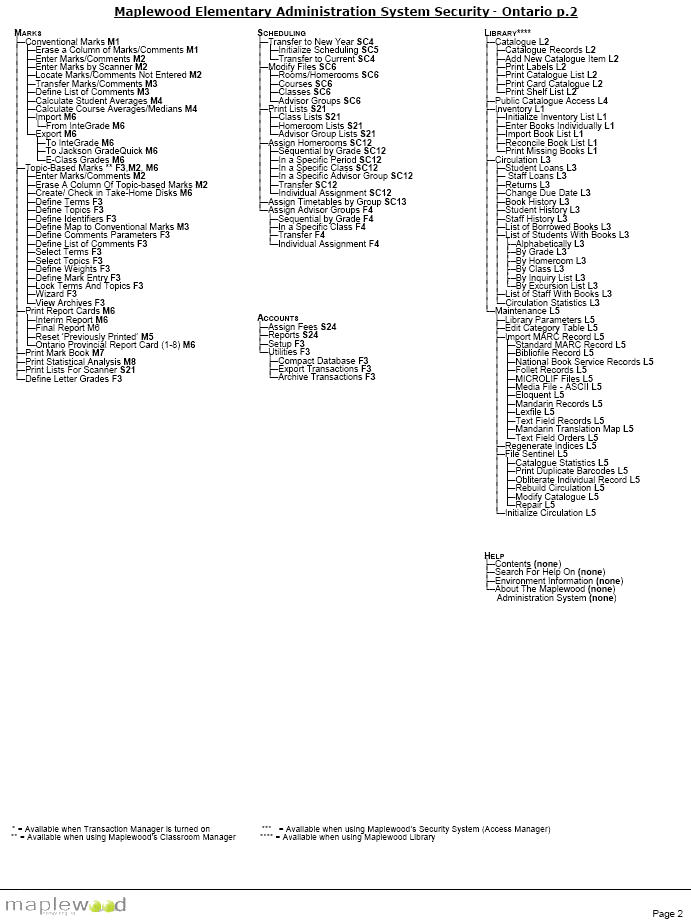
*Cross-reference these codes with the codes on the tree to see menu options that will be impacted when enabling and disabling security codes. (E.g., Turning on the security code F6 Calendar, will enable Edit, New and Clear Events under the File, Calendar menu.) Please note that the sample reference codes listed below are not in any way related to the security settings for the administration system.
| Menu Tree Code |
| F1 |
| F2 |
| F3 |
| F4 |
| F5 |
| F6 |
| F7 |
| F8 |
| F9 |
| F10 |
| F11 |
| F12 |
| F13 |
| F14 |
| F15 |
| F16 |
| F17 |
| F18 |
| F19 |
| F20 |
| F22 |
| S1 |
| S2 |
| S3 |
| S4 |
| S5 |
| S6 |
| S7 |
| S8 |
| S9 |
| S10 |
| S11 |
| S12 |
| S13 |
| S14 |
| S15 |
| S16 |
| S17 |
| S18 |
| S19 |
| S20 |
| S21 |
| S22 |
| S23 |
| S24 |
| S25 |
| S26 |
| S27 |
| S28 |
| S29 |
| S30 |
| S31 |
| S32 |
|
R1 |
Inquiry/Report Builder |
|
R2 |
Clusters & RADAR |
|
|
|
|
AT1 |
Attendance |
|
AT2 |
Attendance Notes |
|
AT3 |
Excursion Lists |
|
|
|
|
M1 |
Erase Marks |
|
M2 |
Enter Topic-Based Marks/Comments |
|
M3 |
Transfer Marks |
|
M4 |
Calculate Averages |
|
M5 |
Reset Previously Printed |
|
M6 |
Print Reports |
|
M7 |
Print Mark Book |
|
M8 |
Statistical Report |
|
|
|
|
SC1 |
Automatic Transcript Update |
|
SC2 |
Modify /Print Transcripts |
|
SC3 |
N/A |
|
SC4 |
Transfer To Current |
|
SC5 |
Initialize Scheduling |
|
SC6 |
Modify Scheduling Files |
|
SC7 |
N/A |
|
SC8 |
N/A |
|
SC9 |
Print Information |
|
SC10 |
N/A |
|
SC11 |
N/A |
|
SC12 |
Assign Scheduling Homerooms |
|
SC13 |
Assign Scheduling Homeroom Timetables |
|
|
|
|
L1 |
Library |
|
L2 |
Cataloguing |
|
L3 |
Circulation |
|
L4 |
Public Access Catalogue |
|
L5 |
Library Maintenance |
Click the graphics below to see the Elementary System menu options. Beside each option on the tree is a number that corresponds to the security code for the Elementary System. Note: If you are printing this page you will print the thumbnail images. Be sure to click and print each graphic separately for the full size.
Student Records - Security Code
This section deals with security codes and how and what they affect in the Student Records area of the Elementary System.
|
Program/Tab |
Relevant Security Name(s) |
Rights To View |
Rights to Edit |
|
Student Records (current) |
Present Students |
Full |
- |
|
Student Records (past) |
Past Students |
Full |
- |
|
Biographics |
Biographics |
Full, View Only |
Full |
|
- Biographics, Name edit |
Name |
Full |
Full |
|
- Biographics, Custody edit |
Biographics |
Full |
Full |
|
Discipline Notes |
N/A |
N/A |
N/A |
|
Family |
Biographics |
Full, View Only |
Full |
|
Emergency |
Biographics |
Full, View Only, None* |
Full |
|
* |
- Medical Notes |
All but, None |
- |
|
- Emergency, Note edit |
Medical Notes |
Full, TWVA, TWVN, TVVN |
Same as view |
|
Enrolment |
Enrolment |
Full |
Full |
|
- Other fields |
Other Programs |
Full |
Same as view |
|
Attendance (half day) |
Attendance |
Full, View Only, TWVA, TWVN**, TVVN** |
Full, TWVA**, TWVN** |
|
Attendance |
Attendance |
Full, View Only |
Full |
|
- Attendance, Notes (both) |
Attendance Notes |
Full, View Only |
Full |
|
History |
Process Transactions |
Full |
Full |
|
Timetable |
Classes |
Full, View Only |
Full |
|
Achievement |
Enter Marks/Comments |
Full, View Only, TWVA, TWVN**, TVVN** |
Full, TWVA**, TWVN** |
|
Notepads |
First (code 9)*, *UC |
Full, for at least one of these 3 |
Full (all 3 must be set to Full) |
|
* |
Second (code 10)*, *UC |
- |
- |
|
* |
Third (code 11), *UC |
- |
- |
|
- Notepad 1 |
First |
Full |
(all 3 must be Full) |
|
- Notepad 2 |
Second |
Full |
(all 3 must be Full) |
|
- Notepad 3 |
Third |
Full |
(all 3 must be Full) |
|
Ontario Report Card Details |
N/A |
N/A |
N/A |
|
Special Ed. |
Special Education |
Full |
Full |
|
- Special Ed; A |
Alternate Program |
Full |
Full |
|
Custom Fields |
Text & List Fields |
Full, View Only |
Full |
|
Transportation |
Biographics |
Full, View Only |
Full |
|
Library |
Library |
Full |
Full |
|
Religion |
Religion |
Full, View Only, TWVA, TWVN**, TVVN** |
Full, TWVA**, TWVN** |
*UC - Security name is user-chosen. * - Dependent on other rights(s) marked by a ‘*’ following.
**- Teacher must have student (in order for whomever is currently using the system, the teacher must have the student for that class. If the school is Half-Day, then the teacher must have the student in the homeroom.
TWVA - Teacher Write, View All Others This means that the teacher can edit students’ information for the classes that they teach the student and they can view all other students’ information but cannot edit unless they have the student for that class. TWVN - Teacher Write, View No Others The teacher can edit students’ information for the classes that they teach the student. They can only view students’ information for the classes in which they have the student. TVVN - Teacher View, View No Others The teacher can view the students for which they teach, but no others.