Homerooms should be assigned when you complete student scheduling, before the current school year begins or just before semester changes. Choose Students, Assign Homerooms and use these commands.
The Sequential By Grade choice will assign homerooms to students of a specific grade. The homerooms to which these students may be assigned must be indicated by entering the homeroom numbers or designations of the desired homerooms. For example, if there will be three homerooms for the grade two students, the three homerooms must be selected from the list of homerooms. If the selected grade two homerooms are 2A, 2B, and 2C, all the grade two students will be evenly distributed among these homerooms.
The distribution of the students into the homerooms may be accomplished by two different methods. The distribution methods are determined by the following choices:
This method of homeroom distribution places the students in homerooms by rotating sequentially through the alphabet. Using the same example, the first student alphabetically by surname would be placed in homeroom 2A, the second student in 2B, the third student in 2C, the fourth student in 2A, the fifth student in 2B, and so on, until all the grade two students have been assigned to homerooms. The resulting homerooms may be similar to the following:
| Homeroom 2A | Homeroom 2B | Homeroom 2C |
| Aaron, Tony | Abbott, June | Acorn, Timothy |
| Andrews, Lynne | Brady, Ricky | Chambres, Mathew |
| Douglas, Helen | Egan, Michael | Henshaw, Sarah |
| Jackson, Patrick | Jones, Brent | MacDonald, Jeff |
| Mitchell, Chris | Parker, Sandra | Redding, Cindy |
This method of homeroom distribution places the students in homerooms using sections of the alphabet. Using the same example, the first 1/3 of the students alphabetically by surname would be placed in homeroom 2A, the second 1/3 would be placed 2B, and the last 1/3 would be placed in 2C. The resulting homerooms may be similar to the following:
| Homeroom 2A | Homeroom 2B | Homeroom 2C |
| Aaron, Tony | Egan, Michael | Redding, Cindy |
| Abbott, June | Henshaw, Sarah | Saunders, John |
| Acorn, Timothy | Jackson, Patrick | Smith, Sean |
| Andrews, Lynne | Jones, Brent | Smith, Wayne |
| Brady, Ricky | MacDonald, Jeff | Twiddle, Susan |
| Chambres, Mathew | Mitchell, Chris | Walker, Jennifer |
2. Assign by the Room of the Class in a Specific Period
This choice will assign homerooms to students according to the room they occupy in a specific period of their timetable. The semester and period of the classes from which the homerooms will be assigned must be entered. Since some students may not be in a class during the desired period (e.g. supervised study students), a homeroom number to be assigned to these students must also be entered.
For example, if a student is taking MAT1A1b during the specified period, his or her homeroom will be the room in which MAT1A1b is taught. If MAT1A1b is taught in room 25, the student's homeroom number will be 25. The homeroom designation will depend on the homeroom designation recorded in the Room/Homeroom File.
This option will assign the same homeroom to all students in a particular class. If all students in the school are to have homerooms assigned on the basis of class location, use the choice Assign By The Room Of The Class In A Specific Period. If only selected classes are to have homerooms assigned in this way, use Assign A Homeroom To An Individual Class.
Assign a Homeroom to an Individual Class
This choice will assign a homeroom number to all students in a particular class. The class and the homeroom number to be assigned to the students must be entered.
For example, if the students in MATH..7b are to be assigned to a homeroom, simply indicate the class (MATH..7b) and the desired homeroom number (e.g. 13). All the students who are taking MATH..7b will be assigned homeroom 13. Note that the homeroom does not necessarily have to be the room in which the class is taught.
4. In a Specific Advisor Group
The program will assign the student(s) the Advisor Group's room. Should the room for an advisor group not be a designated homeroom, the program will create a report informing you the current (or next year's) room(s) that require to be flagged homeroom. The report will also list the affected students.
The Transfer choice will assign the students from one current or scheduling homeroom to another current homeroom. The homeroom from which the students will be transferred must be entered. Then the homeroom to which the students will be transferred must be entered. The students will then automatically have their homeroom numbers changed.
For example, the students in homeroom 25 may be transferred to homeroom 26 using the Transfer option. If there were students previously assigned to homeroom 26, homeroom 26 will contain the students from homerooms 25 and 26. Homeroom 25 will no longer contain any students.
Once the students have been transferred, there is no distinction between the newly transferred students and the original students. Therefore, care must be taken not to transfer a homeroom to one which will be subsequently transferred. Starting the homeroom transfers with the senior students will normally avoid this problem.
Note: If you wish to transfer students from one current or scheduling homeroom to another scheduling homeroom, use the Transfer choice in the scheduling Assign Homerooms.
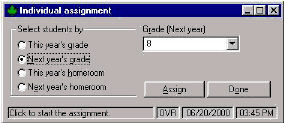
The Individual Assignment feature will display students' names, one at a time, for individual homeroom assignment. Choose Students, Assign Homerooms, Individual Assignment.
Note: If working in Scheduling, you will be able to choose either this year's or next year's grade/homeroom. The only difference is the students who are prompted.
Before assigning homerooms, be sure that Room/Homeroom file has the correct homeroom teachers and room numbers.
You can display the students sequentially in two different orders by selecting from the following options:
Grade: When you enter a grade, this option will display sequentially, the students in one grade. As each student is displayed, the student's current homeroom is prompted. The homeroom to be assigned to the student may be changed by entering the new homeroom or can be left the same. Click OK for the next student.
Homeroom: This option will sequentially display the students in one homeroom upon entry of the desired homeroom number or homeroom designation. As each student in the homeroom is displayed, the student's current homeroom is prompted. Enter the homeroom to be assigned or leave it the same. Click OK for the next student.