We suggest that you only use this option if Maplewood Support has requested a certain file from your school because you are experiencing a specific problem. We ask that you do not send a file to Maplewood unless you have been requested to do so.
When you select this option and send a file (can be a backup or any file), the file is sent to our Customer FTP site location. A folder is created based on the Board number and then within that folder, a subfolder is created based on that school's Ministry Number. A notification email is sent to indicate to Maplewood that a file has been placed on the FTP site. The customer receives confirmation of the file transmission as well.
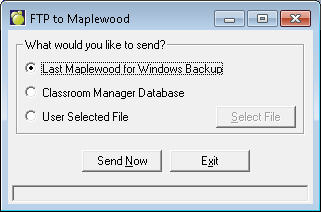
In order to use this option you will need internet access from your desk (or workstation) either through a direct connection or a proxy server. See your network administrator for more information on internet connections at your desk. To access this option, choose File, Maintenance, Send File to Maplewood. When you choose this option will see a window that looks like this:
You can send three different types of files using this option.
Last Maplewood for Windows Backup
Click Send Now sends the most recent Administration System backup directly to Maplewood. If you don't have a recent backup of your school's data, it would be a good idea to do a backup of your school's information before using this option. Click here to see Maplewood Backup/Restore information.
Classroom Manager Database
Click Send Now sends your current Classroom Manager database to Maplewood.
User Selected File
Click Send Now for a prompt that asks you what file you would like to send to Maplewood. Choose File from the menu that will pop up (or click the Select File button) and then select the file to send.
If you receive failure errors while attempting to use this option, please check that you are connected to the internet via a direct connection (your own modem) or a proxy server. If you are using a proxy server, you will need to know the proxy settings and have them setup at your workstation. Your network administrator should be able to help you with this setup.