Back to Secondary Index
Back to Elementary Index
Technology
The Technology submission period collects statistical information on the technology in use at each school and the board office. Although the statistical information is based on the technology in use on October 31st, the submission period is independent of the October school submission periods.
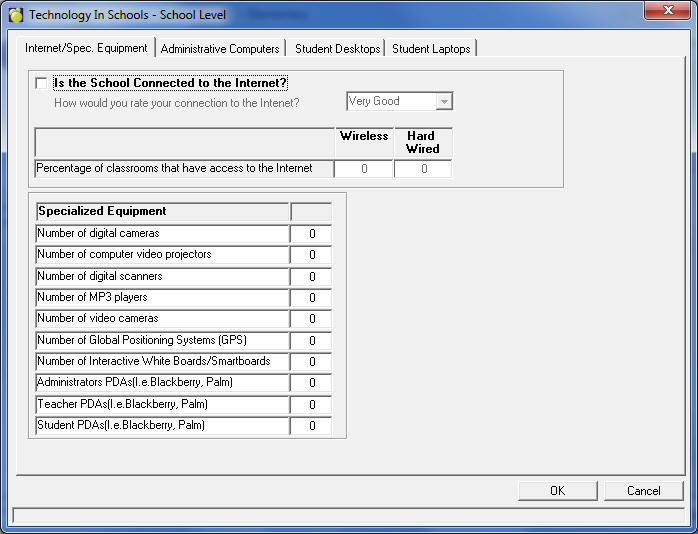
When the Technology Submission Period is selected, a single batch file option will be available for a school called Technology in Schools. Using the Technology button that becomes enabled, the user may navigate through the tabs (shown below), entering the appropriate information where needed. Once the information is entered, the batch file may be created.
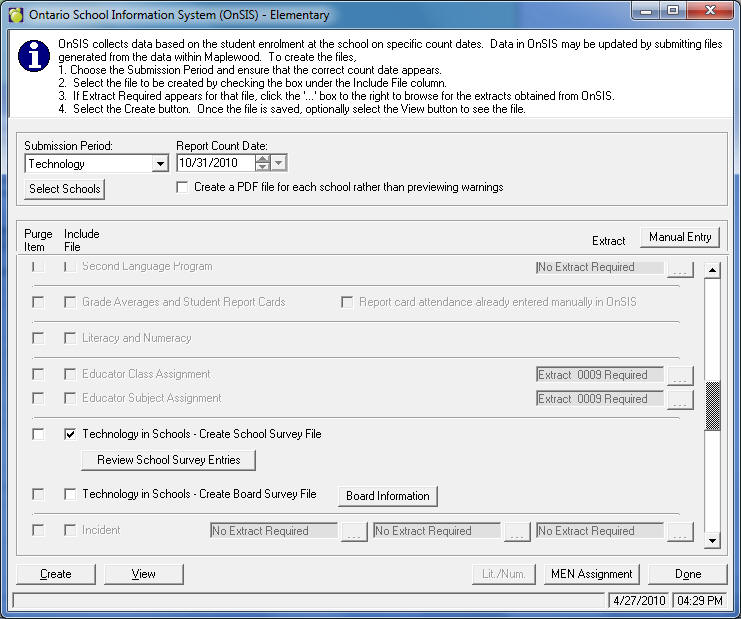
Boards will have access via Central Office to enter and submit the school and board technology information. Using the Review School Survey Entries button, the information will be presented for the school upon selecting the desired school.
This is from Central Office:
Once this information has been entered, the data will be saved from year to year, requiring users to update only those fields that change between submission periods.
Element
Char.
Maplewood Description
DATA
M
This is the outer tag for all data.
SCHOOL_SUBMISSION
M
This is the outer tag for school data submission.
SCHOOL_SUBMISSION/ ACADEMIC_YEAR
M
The combination of element ACADEMIC_YEAR and SUBMISSION_PERIOD_TYPE is used to uniquely identify submission period.
SCHOOL_SUBMISSION/SUBMISSION
_PERIOD_TYPE
M
Submission period type. The value of this element must be consistent with database SUBMISSION_PERIOD_TYPE.SUBMISSION_PERIOD_TYPE_CODE.
SCHOOL_SUBMISSION/ SCHOOL
MR
This is the outer tag for all schools.
SCHOOL_SUBMISSION/SCHOOL/
SCHOOL_NUMBER
M
School Number. The SCHOOL_NUMBER is used to uniquely identify the school.
SCHOOL_SUBMISSION/CLEAR_PENDING_AREA
M
Y/N - to delete all records from the pending area for this school.
SCHOOL_SUBMISSION/ Batch Files Purge and Pre-Population XML Tags
M
Y/N - to delete data sections from the pending area for this School.Refer to Appendix A – Batch Files Purge and Pre-Population XML Tags.
SCHOOL_SUBMISSION/SCHOOL/SURVEY
MR
This is the outer tag for Survey.
SCHOOL_SUBMISSION/SCHOOL/SURVEY/
SURVEY_TYPE
M
Survey type (e.g., “STS - Technology in Schools at school level). The value of this element must be consistent with the database. SURVEY_TYPE. SURVEY TYPE _CODE.
SCHOOL_SUBMISSION/SCHOOL/
SURVEY/SURVEY_RESPONSE
MR
This is the outer tag for survey response.
SCHOOL_SUBMISSION/
SCHOOL/SURVEY/SURVEY_RESPONSE/ACTION
M
This is the action associated with this submission.
Value: “ADD “UPDATE “DELETE.
SCHOOL_SUBMISSION/SCHOOL/SURVEY/ SURVEY_RESPONSE/QUESTION_CODE
M
Uniquely identifies the code corresponding to the survey question.
SCHOOL_SUBMISSION/SCHOOL/SURVEY/ SURVEY_RESPONSE /ANSWER
M
The answer to the survey question. The value must be consistent with the expected response type as follows:
-
A non-numeric response will be rejected if a number is expected.
-
When there is a defined list of possible values - this would equate to the items listed in the corresponding dropdown in the online form - a value not in the list of valid values will be rejected.
-
A value other than ‘Y’ or ‘N’ will be rejected if a Boolean is expected.
SCHOOL_SUBMISSION/SCHOOL/SURVEY/ SURVEY_RESPONSE/OTHER_DESCRIPTION
C
Other description.