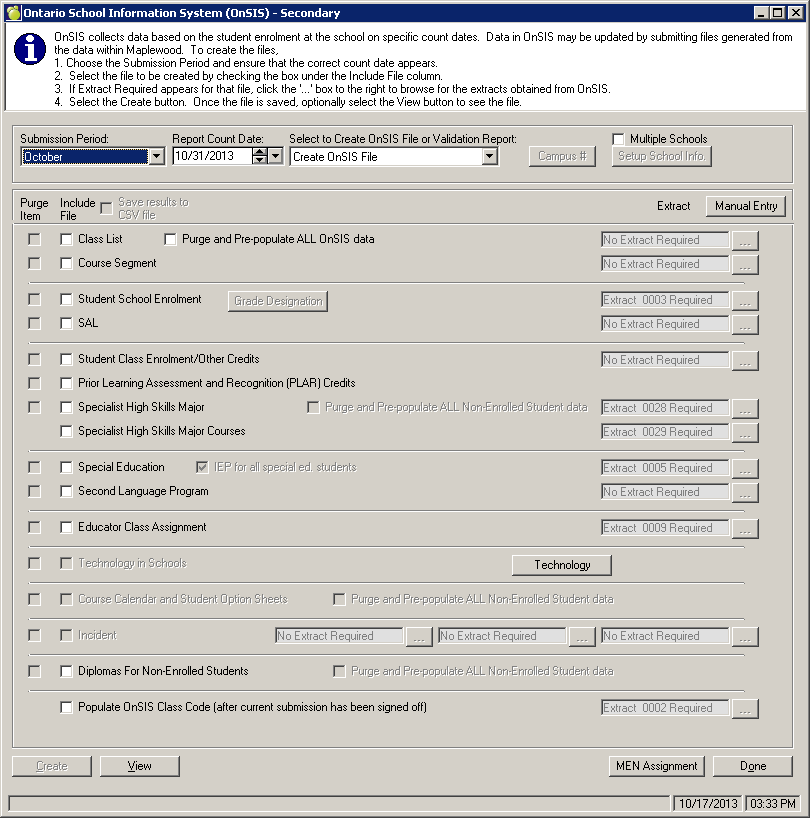
Secondary publicly funded schools are required to complete four OnSIS submission periods each academic year. The Ministry’s OnSIS application will refer to these submission periods as:
October Secondary School (October 31 count date)
Technology in Secondary Schools (October 31 count date)
March Secondary School (March 31 count date)
June Secondary School (June 30 count date)
Secondary Public School Suspensions/Expulsions (June 30 count date)
At the start of each academic year, please familiarize yourself with the data elements which will be collected in each of the OnSIS batch files. Please ensure that all data is correctly entered for the students throughout the year. Throughout the academic year, make sure the students have their classes in their timetables, and, at the end of each semester (or term if applicable), update the transcripts with the final marks.
Here are the basic steps for completing these submission periods:
Review the chart of data elements contained in the batch files to ensure that you have entered all the data required for this submission. The following batch files are required:
Class List
Course Segment
Student School Enrolment
SAL
Student Class Enrolment/Other Credits
Prior Learning Assessment and Recognition (PLAR) Credits
Specialist High Skills Major
Specialist High Skills Major Courses
Special Education
Second Language Program
Educator Class Assignments
Course Calendar and Student Option Sheets *
Incident **
Diplomas for Non-Enrolled Students
Technology in Schools***
Pre-population for Classes****
* only collected in March submission
** only collected in Suspensions/Expulsions submission
**** optional feature applicable in October and March
Once the submission period is opened, obtain extracts from the Ministry’s OnSIS application. Extracts provide information about the data that OnSIS has pre-populated into this submission period. For further information on extracts, read Pre-populated Data and Extracts. Note: When the Educator Assignments extract (extract 009) is required by Maplewood, and the educator data has been updated after this step, a new extract 009 is required.
Create the batch files using Reports, OEN/OnSIS, Create OnSIS Batch Files (Secondary). At the resulting screen, in the Submission Period box, select either October, March, June, or Suspensions/Expulsions. Create the required batch file(s). For further information on creating batch files, and the purpose of the purge check boxes, read Creating Batch files in Maplewood.
Users may not see all the batch file options. Be sure to use the provided scroll bar to view all options, or click the maximize button in the top right of the Maplewood form.