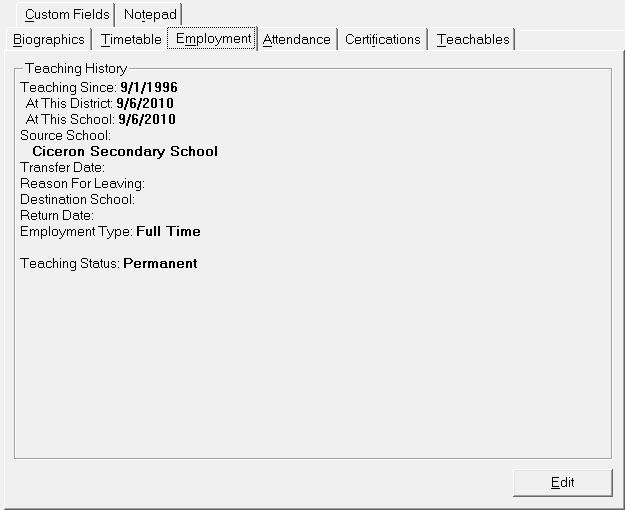
Staff Employment Tab
Choose Staff, Staff Records, select a staff member and click the Employment tab to see this Employment information box.
Note: Caribbean Community and Common Market users will also see Teachables, Attendance and Certification tabs.
You will see this editing box for Staff Employment when you click Edit on the Employment tab.
Special Note:
Staff members' employment statuses are limited in the edit screen, depending on whether the teacher has classes or homerooms in this year or next.
Specifically:
- If a teacher has no classes or homerooms, all statuses will be available.
- If a teacher has this year classes or homerooms, only This Year & Next and This Year Only are available.
- If a teacher has next year classes or homerooms, only This Year & Next and Next Year Only are available.
- If a teacher has classes or homerooms in both this year and next year, only This Year & Next will be available.
In addition, if a staff member already has a status of Deleted, but has classes/homerooms assigned, an error message will appear on the initial staff screen indicating "Deleted Staff Member Still Assigned To Classes".
This is to prevent teachers' records from being deleted when there is the possibility that marks/comments are still attached to them.
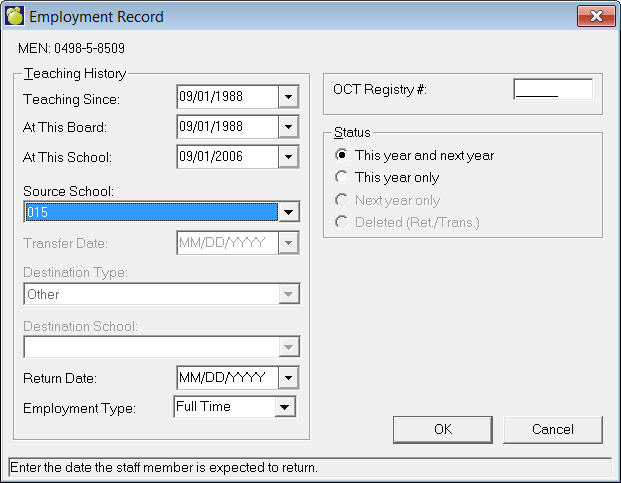
For each jurisdiction MEN has different terms:
Alberta: Teacher Certificate Number - 6 digits & 1 alpha (i.e., 134162S).
British Columbia: Professional/File Number - 12 digits
Ontario MEN (Ministry Educator Number)
Caribbean Community and Common Market - Staff ID Number
Manitoba: PSP Number - 5 digits
Northwest Territories: Teacher Certificate Number - 12 digits
Nova Scotia: Professional/File Number - 12 digits
Saskatchewan: Teacher Certificate Number -10 digits
United States: HR Number - 12digits
Ontario OCT Registry = (Ontario College of Teachers) number.
Caribbean Community and Common Market - Additional Number found on the Biographics, Name window that can be used to store a special number.