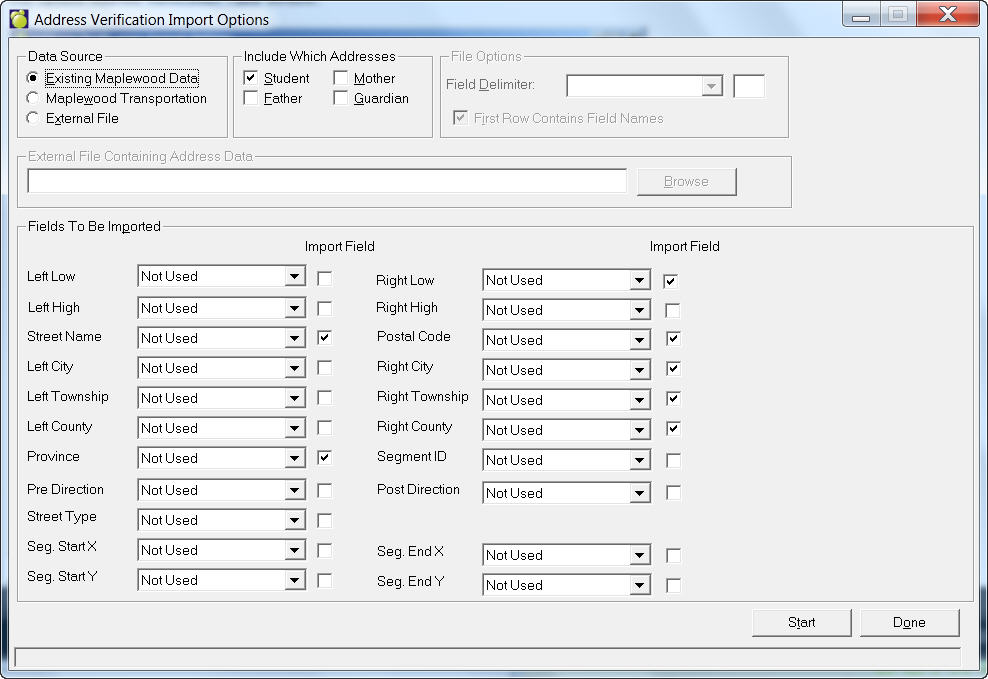
After you have set up your Address Tables you can update them by choosing, File, Maintenance, Address Verification, Update Verification Table. You will see this Update Address Verification Table window:
Data Source
Three data source options are available to populate the Maplewood Address Verification table.
Existing Maplewood Data populates the Maplewood Address Verification table based on the criteria specified in the Include Which Addresses frame.
Maplewood Transportation, uses Maplewood Transportation data to populate the Maplewood Address Verification Table. If you use this option you must specify the path of the Streets table.
External File allows you to use a file containing address information to populate the Maplewood Address Verification table. If you use this option you must specify the field mapping between the fields in the file and the fields in the Maplewood Address Verification table.
Include Which Addresses
Check the boxes beside Student, Father, Mother and/or Guardian. Note: This will be disabled when you have selected External File as the Data Source.
File Options
Select a Field Delimiter from the drop-down list. Check if the first line contains the field names. Note: This area will be disabled if you have selected either Existing Maplewood Data or Maplewood Transportation as the Data Source.
External File Containing Address Data
Enter the location or click the Browse button to specify the location.
Fields To Be Imported
Select the fields to be imported by using the drop-down lists. Next click the checkboxes where appropriate to make the field required.
Additional Links
For more information on setting up Address Verification in Custom Fields/Tables, click here.
For more information on verifying addresses under File, Maintenance, Address Verification, click here.