Each EQAO file contains all the eligible students in the board (district) in a single batch file (in XML format). Boards cannot submit files one school at a time as each subsequent batch file will overwrite the previous one. For this reason, the EQAO exports should be generated using Maplewood Central Office. When creating the EQAO files, students with the same OEN number registered in more than one home school are now included on a printout.
Here is a general overview of the process for each assessment/test:
Schools should follow the specific timelines provided by EQAO for these steps. Although boards create the files in step 1, schools can create a trial files from their own Maplewood systems so they can see who the eligible students are, and what data will be submitted for them.
To create the files, either through Central Office (for actual submission to EQAO) or through Maplewood Secondary (for trial purposes),
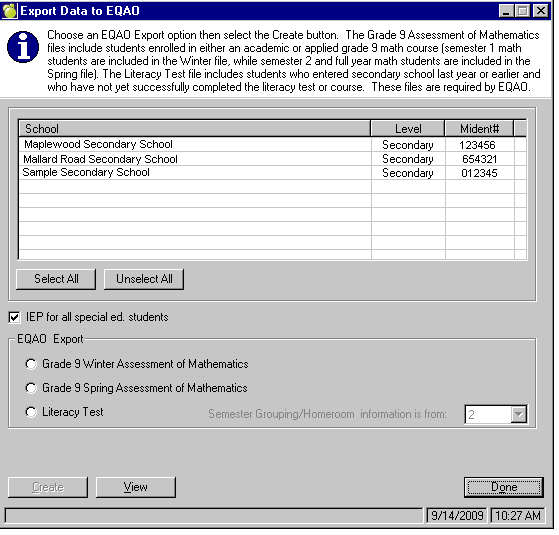
Choose Reports, EQAO, Export Secondary Data to EQAO (which is used to create the files for Grade 9 Mathematics (Winter and Spring) and the Ontario Secondary School Literacy Test).
Next select the EQAO Export option (i.e. Grade 9 Winter). Check IEP for all special ed. students if applicable.
If creating the file through Central Office, choose the schools you wish to include in the export.
Select Create button and proceed as directed on the screen.
Review the printout of students with missing information. If data needs to be corrected, please correct, then re-create the file prior to submitting to EQAO for processing.
All files are defaulted in the Maplewood data folder in the Export\EQAO folder.
Please review the EQAO submission timelines for the deadlines on file submissions.
The grade 9 assessment of mathematics takes place twice a year: Winter and Spring. The Winter assessment includes students enrolled in a first-semester grade 9 applied or academic mathematics course. The Spring assessment includes students enrolled in a second-semester or full-year grade 9 applied or academic mathematics course. Students enrolled in a locally developed grade 9 mathematics course do not write the assessment and will not be included in the file. Students who are in any type of Credit Recovery program are also not included in the file.
Maplewood considers any course with the pattern M??1P or M??1D as a grade 9 applied or academic course. Checking the box "IEP for all special ed. students" will set the IEPStatus field in the EQAO file to 1 (Yes) if a special education student has an active status and an exceptionality (including Gifted)."
For more information on the data collected, see SDC - Process EQAO Grade 9 Assessment of Mathematics, Winter and Spring
Please review the EQAO submission timelines for the deadlines on file submissions.
EQAO now offers an online option for the OSSLT. With this option students are able to register to take the OSSLT in October, instead of waiting for the paper version in March (note: Online version is also available in March).
The grade 10 Ontario Secondary School Literacy Test should include:
To determine which students are to be included, Maplewood uses the student’s entry date to secondary school (on the Enrolment tab) and the literacy completion status field (in the student’s record use View, Report Card Details & EQAO, Literacy Component tab). A student is included in the file if these 2 conditions are met:
Checking the box "IEP for all special ed. students" will set the IEPStatus field in the EQAO file to 1 (Yes) if a special education student has an active status and an exceptionality other than Gifted.
SDC - Secondary School Literacy Test. To see the data collected in this file, use the links below:
Note: EQAO does collect other information from schools, although this information may not be requested on a regular basis, and may not include all schools within the board. Other elementary file submissions include:
To create the files, either through Central Office (for actual submission to EQAO) or through Maplewood Elementary (for trial purposes),
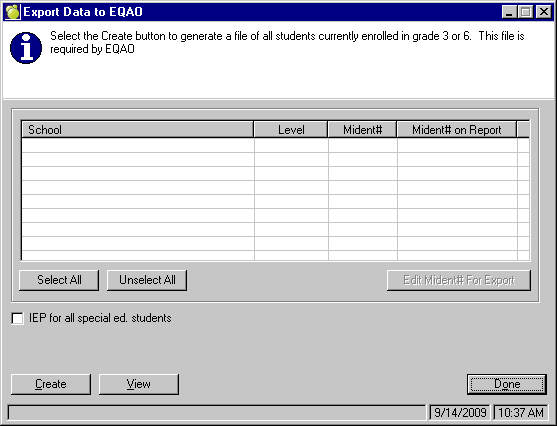
Choose Reports, EQAO, Export Elementary Data to EQAO (is used to create the file for Grade 3 and 6 Assessments of Reading, Writing, and Mathematics). Note: This menu option appears in any secondary school that includes grade 3 or 6 in the table of grades
Check IEP for all special ed. students if applicable.
If creating the file through Central Office, choose the schools you wish to include in the export. Note: the 'Mident# on Report' field should only be populated if a school has 2 Mident numbers (i.e. 1 for elementary grades in the school, and 1 for secondary students in the school).
Select Create button and proceed as directed on the screen.
Review the printout of students with missing information. If data needs to be corrected, please correct, then re-create the file prior to submitting to EQAO for processing.
All files are defaulted in the Maplewood data folder in the Export\EQAO folder.
Please review the EQAO submission timelines for the deadlines on file submissions.
Export Elementary Data to EQAO is used to create the files for the Grade 3 and 6 Assessments of Reading, Writing and Mathematics. To create a file, simply choose the export option, select Create and proceed as directed on the screen. When created through Central Office, the standard select schools screen will appear at which point all Elementary schools should be selected. The Grade 3 and 6 Assessment of Reading, Writing and Mathematics file should include:
Those who entered grade 3 or 6 in the current school year.
Grade 3 and 6 students who are eligible to write the assessment but will be exempted.
Maplewood includes all student currently enrolled in the school with a “This Year” grade of 3 or 6. Students with an enrolment status of Deleted or Next Year Only are not included.
Checking the box "IEP for all special ed. students" will set the IEPStatus field in the EQAO file to 1 (Yes) if a special education student has an active status and an exceptionality other than Gifted.
See Grade 3 and Grade 6 Assessments of Reading, Writing and Mathematics for more information. Here is the data collected in this file
Note: EQAO does collect other information from schools, although this information may not be requested on a regular basis, and may not include all schools within the board. Other elementary file submissions include: