An advisor group is a way to assign a group of students to a teacher or teachers who will supervise them in a specific room.
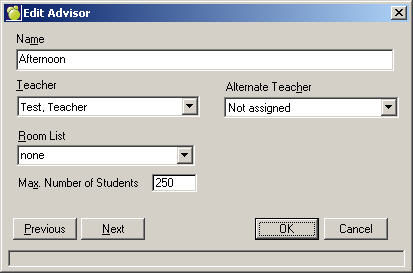
To add an advisor group, choose File, School Setup, Advisor Groups. A list of Advisors (if any) will appear. To add an Advisor, click Add. To edit an existing Advisor, click Edit. This is an example of an editing box. The adding box will look the same with no information entered.
Enter a Name and select a Teacher and Additional Teacher from each list. Select a Room and enter a maximum number of students.
When you have entered all relevant information, click OK to continue. The initial list of Advisors will appear. From here, you can add or edit, or return to the main system.
To assign an Advisor Group to students, choose Students, Assign Advisor Groups. Then choose the assigning method. See more under Assign Advisor Groups in Chapter 2: Student Records.
To print an Advisor Group (i.e. a list of students in the group), choose Students, Print Lists, Specific Advisor Group.