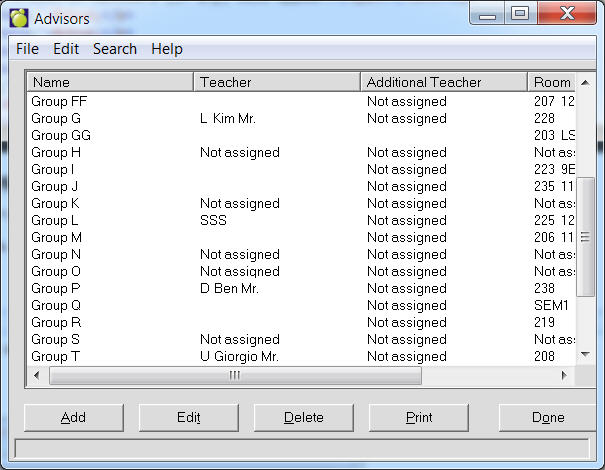
An advisor group is a way to assign a group of students to a teacher or teachers who will supervise them in a specific room.
To add an advisor group, choose File, School Setup, Advisor Groups. A list of Advisors (if any) will appear.
To add an Advisor, click Add. To edit an existing Advisor, click Edit.
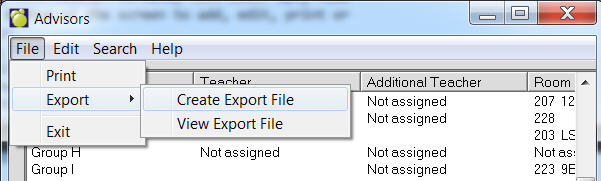
Advisor Groups can now be exported to a file. To do this, use the menu at the top to select File, Export, Save. Once the file is created, it may be viewed by selecting File, Export, File Export View. The file is in comma delimited format (csv) and includes headers. For hosting customers, if you want to use the file in Excel (as an example), use the View option to find the file and then copy and paste it to a local machine licensed for Excel.
Use the option buttons at the bottom of the screen to add, edit, print or delete Advisor Groups.
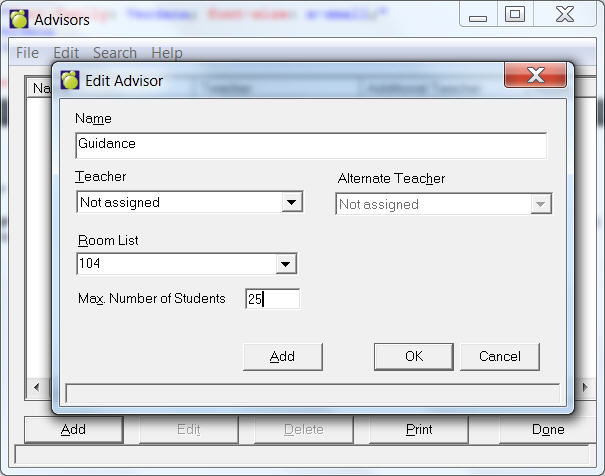
Enter a Name and select a Teacher and Additional Teacher from each list. Select a Room and enter a maximum number of students.
When you have entered all relevant information, click OK to continue. The initial list of Advisors will appear. From here, you can add or edit, or return to the main system.
To assign an Advisor Group to students, choose Students, Assign Advisor Groups. Then choose the assigning method. See more under Assign Advisor Groups in Chapter 2: Student Records.
To print an Advisor Group (i.e. a list of students in the group), choose Students, Print Lists, Specific Advisor Group.