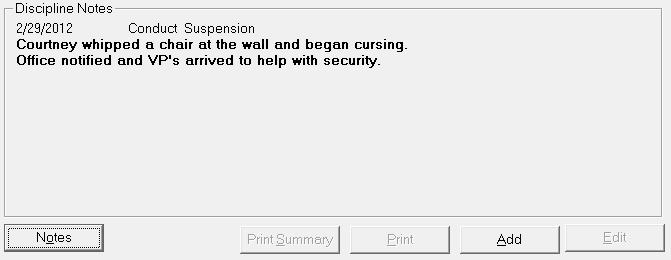
The Discipline tab has 2 functions:
To provide a simple Discipline Note area to record a dated note along with a single infraction and consequence related to each note.
To provide a detailed Incident Tracking area to record comprehensive information on discipline incidents.
Schools may opt to use either one of these areas, or a combination of both.
Note: The Ontario Board October Report will use Incident Tracking, not Discipline Notes.
From the Discipline Tab in the student's record, click the Notes button. A list of the student's discipline notes appears. Use the Edit or Delete button to remove the selected note. Use Print to print the notes. Click Add to add a new discipline note along with the date, infraction, and consequence.
The Infraction and Consequence entries are set up under Custom Fields and Tables. Use these links to see how to set up these tables:Students, Custom Fields/Tables, Discipline Notes, Infractions and Consequences
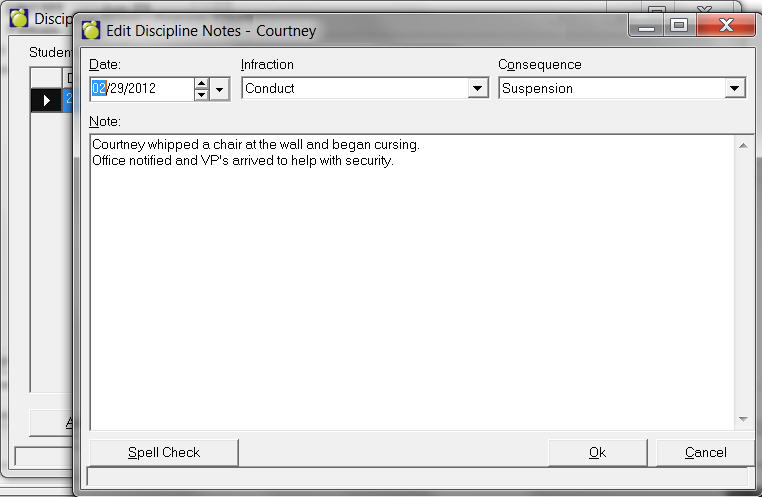
You can use the Spell Check button before you save your note. Save your Note by clicking OK.
From the Discipline tab in the student's record, use the Print, Add, and Edit buttons to record detailed information about the student's discipline incidents. Add will add a new incident, Edit will present the list of existing incidents, and Print will allow specific incident reports to be printed.
Use these links for complete information on Student Incident Tracking: