The British Columbia Ministry of Education TRAX Unit's primary method of communication to schools is via the TRAX Updates notification service. Appropriate school staff should subscribe at: www.bced.gov.bc.ca/exams/trx_updates/.
The Transcript and Examinations System (TRAX) allows schools to export student demographic and course data information to the Ministry’s Examination Branch. It also enables the schools to register their students for Provincial and Scholarship Examinations. At specific times throughout the school year, schools and/or districts are required to export TRAX data files to the Ministry via the School Secure Web: www.bced.gov.bc.ca/exams/stw/princ_terms.jsp. Schools are welcome to upload TRAX files at other times between mid-October and mid-July, to help keep transcript records up-to-date for students who complete courses outside a standard semester of a full year timetable. Turbo-TRAX is a software verification package that the Ministry provides to schools free of charge. It enables schools to check and correct their data before making each electronic transfer. Schools may download the latest version of Turbo-TRAX from: www.turboschool.com.
Schools send data to the Ministry for students who are in Grades 10, 11 or 12, or the Adult Graduation Program, as well as students in other grades who were registered to write exams. The submission of grades is intended to:
Provide the Ministry with final school percentages for provincially-examinable courses for the current exam session, which enables the Ministry to calculate final marks and provide results to students.
Provide the Ministry with interim percentages (in April only) for the Early Admission Program (Early Admission students only). The Ministry transfers these marks to post-secondary institutions so they can provide provisional acceptance offers to students.
Add registrations for the next exam session.
Update the Ministry’s student files by correcting demographic data, providing final percentages, letter grades and credit values for non-examinable courses, and making course changes.
Update student files by February with correct citizenship information for Scholarship and Passport to Education allocation purposes.
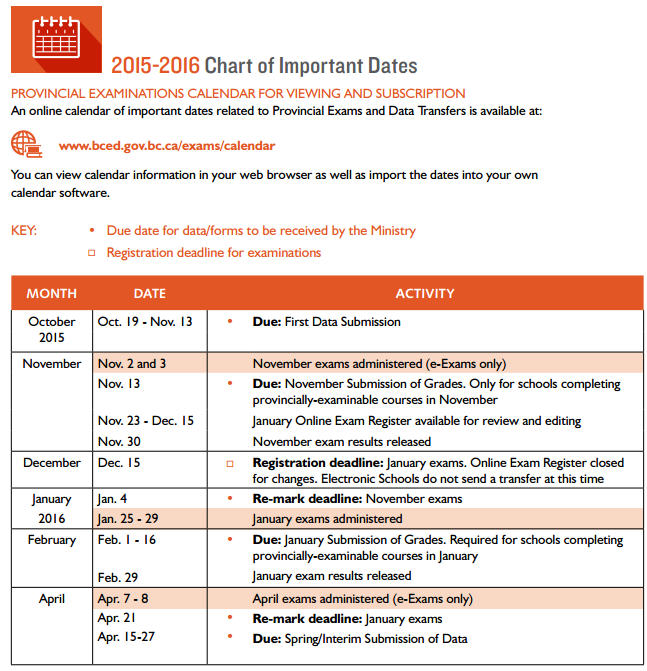
The following is the Chart of Important Dates as taken from the Handbook of Procedures for the Graduation Program.
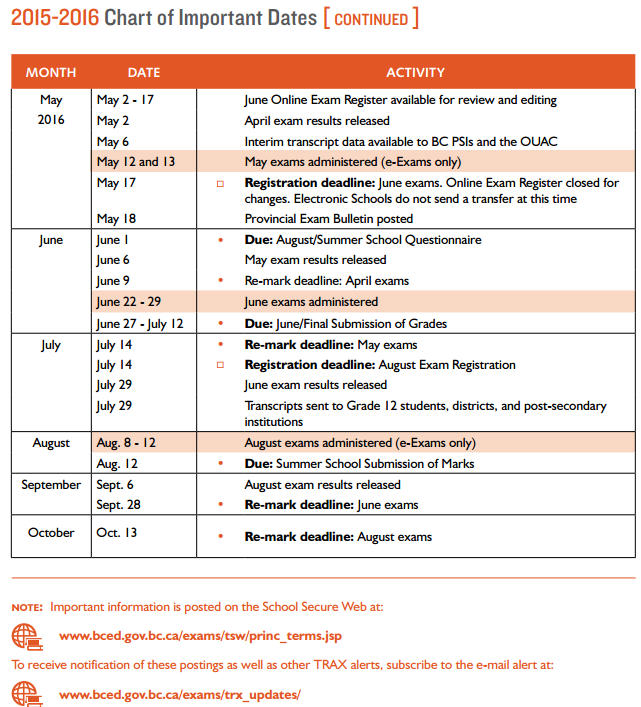
* The April Submission of Grades differs slightly as schools are asked to provide interim marks for students who are applying for early admission. The Ministry sends these interim marks to participating British Columbia post-secondary institutions and the Ontario Universities’ Application Centre in early May.
Each electronic data transfer contains current demographic date (DEM file), course data (CRS file) and exam registration data (XAM file). Each transfer is designed to overwrite the CRS data previously transferred to the Ministry. Data transfer error reports and non-graduation reports are posted within 3 business hours.
Note: Schools cannot revise or submit the school percentage of provincially-examinable courses from past sessions electronically. To submit a school percentage for a provincially-examinable course in a historical exam session, the school must use a Transcripts and Examinations Change Form.
Maplewood's TRAX program creates 3 different files:
DEM file = DEMOGRAPHICS DATA - This file contains demographic information. It includes the school facility code (school number), Personal Education Number (PEN), local student ID, full legal name, gender, date of birth, current grade, citizenship, address, program participation code and graduation requirements. The file name is ########.DEM, where ######## is your school number. Link to the contents of the DEM file.
CRS File = COURSE DATA - This file contains information on non-provincially examinable courses. It includes registration for current courses, and courses completed in the past (e.g. transcripts), including interim marks and final marks. For students on the 2004 Graduation Program, all Grade 10, 11 and 12 non-examinable courses are included. For students on the Adult Graduation Program, all Grade 11 and 12 non-examinable courses are included. The file name is ########.CRS, where ######## is your school number. Link to the contents of the CRS file.
XAM File = EXAM REGISTRATION DATA - This file contains information on provincially-examinable courses. It includes Provincial Exam registrations, school percentages, exam results* and interim marks. *The same format is used by the Ministry to send exam results to the schools. The file name is ########.XAM, where ######## is your school number. Link to the contents of the XAM file.
The Ministry states that schools must include data for their students based on their graduation program:
Maplewood's files will contain data for each student enrolled in the school:
Please refer to your TRAX documentation for a complete listing of all stages in the process, or refer to Chapter 7 - Transcript and Examinations Information Updates (TRAX updates) in the Ministry's Handbook of Procedures for the Graduation Program. The Ministry's official Provincial Examination Calendar for all deadlines can be found here: http://www.bced.gov.bc.ca/exams/calendar/
Each TRAX submission involves the following steps:
Create the TRAX files in Maplewood
Check the TRAX files using Turbo-Trax
Submit TRAX files to the Ministry
When provincial exams have been written and final marks are available, the marks may be transferred from the Ministry into the students' transcripts. At the end of the school year, exam results must be imported before the school transfers to current.