Markbooks
The Achievement area of Maplewood connectEd provides the tools to record
students’ marks and comments which can be shared with students, parents,
and used on report cards. Some teachers may want to record more assessment
information than just the marks and comments for report cards. This additional
classroom assessment information may be recorded in a markbook, as described
in this section of the manual.
Before any teacher may begin to use the Achievement options in Maplewood
connectEd, the school office must first set up some important parameters
that are vital to the achievement area. Maplewood’s staff works closely
with divisions, boards, and individual schools to ensure that the setup
is done correctly and in a manner that will allow the school’s report
cards to be generated. Before reading this section on markbooks, please
first read the section on Report
Cards, including General
Overview of the Office Setup for Report Cards to help understand key
concepts and terminology used in the achievement area, including the entry
of the report card marks and comments.
Markbooks are simply another layer of marks/comments in the Marks/Comments
by Class and Marks/Comments
by Students areas of Maplewood connectEd. If you are not yet familiar
with these areas, please take a moment to read at least one of these sections.
The markbook section of the manual is explained in 4 sections:
Setting Up a Markbook
Curriculum in Markbooks
Homework
Copy Markbooks
In addition to this, you might also read these sections:
Achievement Reports
Sharing Achievement Information
with Students and Parents
Here is a summary of the key concepts of markbooks that are explained
primarily in the Setting Up A Markbook section:
- The school office determines whether or not the teacher has access
to the markbooks.
- The school office determines the type of markbook (see Cumulative
vs Non-Cumulative Markbook for a description of the different styles).
- The report card controls the terms and topics/subtopics setup for
each class.
- Markbook entry is typically entered for one class at a time, however
classes with the same terms and topics may be linked (before markbooks
are used) so that both class lists can optionally appear on the mark
entry screens.
- Every topic/subtopic that gets evaluated in the report card can
have its own markbook (e.g. if the report card has an overall grade
along with an evaluation for the Learning Skill 'Responsibility',
then markbooks may be created for the Grade topic as well as the Responsibility
subtopic, however, a teacher will typically only create one markbook
(usually tied to the overall grade)).
- Markbooks use teacher-defined categories to help organize the marks
that will be recorded in the markbook. Example categories might be
Tests, Assignments, Quizzes or they might be Knowledge, Communication,
Application, or any configuration that the teacher chooses to use.
If categories are not required, one category must still be created
but it could be called Marks.
- Categories can be weighted toward the report card mark for the
markbook. Weights can be any value and don't necessarily have to add
to 100 (but often that is the most logical weighting).
- Categories may be published to the parents and students.
- Markbook items are the individual assessment results (e.g. test
scores, project marks, participation marks) that the teacher wants
to record in the markbook.
- Markbook items are assigned to categories.
- Markbook items can be weighted toward the overall category mark,
so that the teacher can determine how much influence the mark has
on the overall category mark.
- Categories are weighted toward the overall mark.
- Any calculated marks (e.g. category mark and overall mark) may
be overwritten by the teacher. Overwritten marks appear with a yellow
background. Deleting the overwritten mark will return it to the calculated
mark.
- Markbook items can be given an assessment type of diagnostic, formative,
or summative, where the first two types will default 0 weighting since
they typically don't influence the student's overall mark.
- Markbook items may be published to the parents and students.
- Markbook items can include up to 2 comment per item: comments for
the teacher's use only (unpublished) and comments published to the
student and parents.
- Markbooks are accessed using the Marks/Comments by Class and Marks/Comments
by Grade options within the Achievement area of Maplewood connectEd.
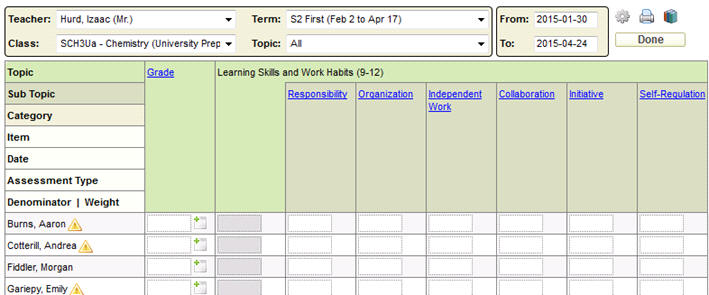
The topic/subtopic that has no markbook yet will have a blue hyperlink
(e.g. it's in blue and underlined like Grade and Responsibility in
the screen below). The hyperlinks will appear in black once a markbook
exists.
- Click the topic or subtopic hyperlink to see a menu of actions.
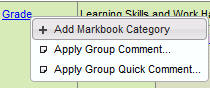
- The hyperlink menu, for a brand new markbook, only includes "Add
Markbook Category" (along with the group comment actions that
always appear), since at least one category must exist in each markbook:
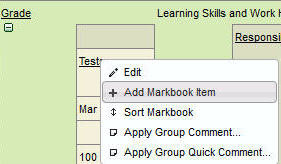
- Once a category has been defined, a markbook exists. Markbook items
are added through the hyperlink menu for the category using the option
'Add Markbook Item'. This is the option the teacher uses to create
a new assessment area to record an evaluation:
- Markbook items may apply to all students in the class or students
may be excluded from the evaluation.
- Markbook items may be associated with the course curriculum so
that the teacher may keep track of what parts of the curriculum have
been assessed.
Homework may be assigned to markbook items.
- Markbooks may be copied from one class to another or from year
to year.
- Categories and Items may be visible (expanded) or hidden (collapsed)
using the
 and
and  icons, and the Options
  icon allows the user to control
whether items and/or categories are displayed, and in what order.
It is even possible to change the order of the categories and items
if the order in which they were entered is not the preferred order.
icon allows the user to control
whether items and/or categories are displayed, and in what order.
It is even possible to change the order of the categories and items
if the order in which they were entered is not the preferred order.
- Tools are also available within the markbook that show class and
student marks statistics based on the assessment information that
has been entered.
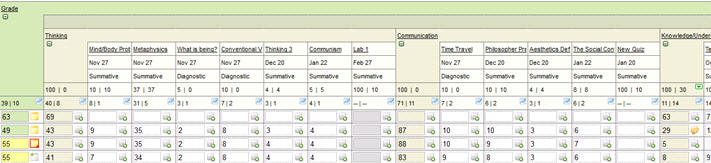
Here's an example of a markbook in the Marks/Comments by Class area:
Definition of Markbook Terminology:
Categories are subsections of
the reporting topic/subtopic as set up by the office. For example, if
the report card prints a grade, but as a teacher you would like to break
your evaluation for the grade down further into three main areas, these
would be Categories, (e.g. Tests, Assignments and Participation).
Items are elements of an above-defined
Category. For example, as a teacher you would like to further break down
your evaluation for the Category of Tests to show the results of Test
1, Test 2 and Test 3 independently. The three tests would be Items of
the Category Tests.
Denominator: This is the “out
of” number, which by default is set to 100. This is the number of available
marks for an item, or the expression written below the line in a common
fraction that indicates the number of parts into which one whole is divided.
For example, rather than having to convert 20/25 to a mark of 80, simply
have the denominator for an Item set to 25 and enter the marks out of
25. The system will then make the appropriate calculations. The Denominator
gives teachers the ability to record raw marks, rather than having to
do calculations into percentages. Unless tied directly to the weight,
(to be explained later) the denominator has no relation to the importance/weight
of an Item.
Tip: If the Category’s Denominators are
set to 100, the mark in this column will be represented as a percentage.
Weight: All Categories and Items
by default are given a weight of 10. Weights need to be defined for each
Category and each Item created. Category weights work as a ratio/percentage
against other weighted Categories in a markbook. Item weights also work
as a ratio/percentage against other weighted items within a Category.
For example, all Category weights could be set to have a weight of 10,
which makes all categories worth the same value towards the markbook topic,
or they could be set to numbers that total 100 (ie. Tests 30, Assignments
60, Participation 10 =100). Item weights work in the same manner as Category
weights. Weights do not need to add up to 100 for either Categories or
Items, but they can be setup as such, if this gives the desired result
for the grade.
Giving an Item a weight of zero (0) will cause that item not to be calculated
into the Category at all. Similarly, a Category with a weight of zero
(0) will not be calculated into the term mark.
Subcategories are another level
of the markbook that can be used, between Categories and Items.